The smallest meaningful unit of a REST client
Pico API is a lightweight HTTP client and REST API testing tool for Chrome. Send requests, debug APIs, and watch streaming responses live — without leaving your browser or creating an account.
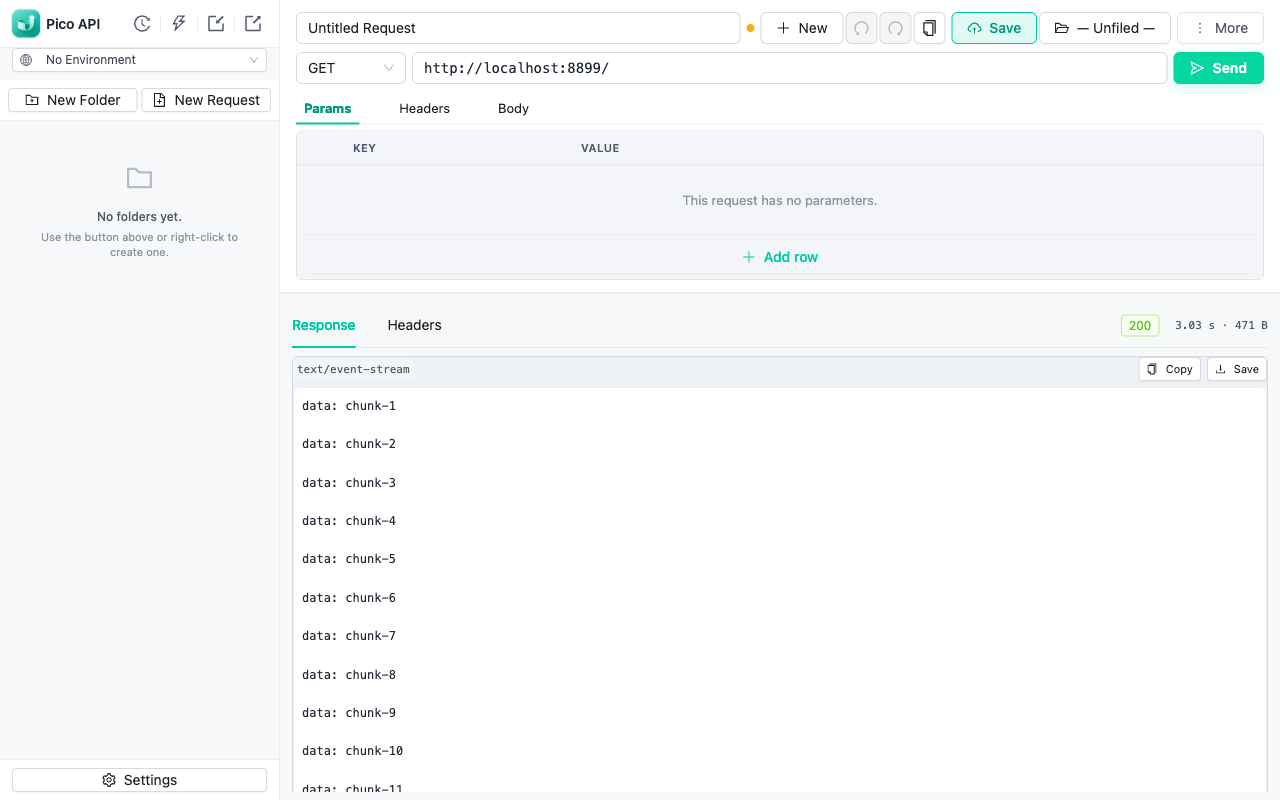
Everything you need to debug APIs
A focused feature set — nothing you have to sign up for.
Live streaming responses
Server-sent events and chunked responses render as they arrive — no waiting for the full body.
Environments & variables
Switch between dev / staging / prod with {{variables}} resolved everywhere — URL, headers, body, and scripts.
Pre/post-request scripts
Postman-style pm API in a hardened sandbox: set variables, assert responses, run tests.
Import & export
Import cURL commands, OpenAPI/Swagger specs, and ApiFox projects. Export collections or copy any request as cURL.
Browser cookies & CORS bypass
Requests go through the extension's service worker, so CORS won't block you — optionally attach your browser session cookies.
Collections, history, undo
Organize requests in a folder tree, revisit every sent request, and undo/redo edits with full keyboard shortcuts.
Local-first & private
All data stays in your browser's IndexedDB. No accounts, no analytics, no sync — your APIs are your business.
Command palette & shortcuts
A ⌘K-style palette for switching requests and environments, plus send / save / duplicate shortcuts.
Get started
Two ways to install — pick whichever you prefer.
- From the Chrome Web Store (recommended) — or use the Install button above.
- From source — clone the GitHub repo, run
npm run build, then load thedist/folder viachrome://extensions→ Developer mode → Load unpacked. - Type a URL, press Send — your requests and responses stay on this machine.
FAQ
Is Pico API free?
Yes. Pico API is free to install and use, with no account required.
Does Pico API collect my data?
No. Everything — saved requests, environments, history, settings — is stored locally in your browser via IndexedDB. There are no analytics, ads, or third-party scripts. See the privacy policy.
How is Pico API different from Postman or Insomnia?
Pico API runs entirely inside Chrome with zero setup or account. It is intentionally small: a request builder, response viewer, environments, and scripting — without the platform weight.
Can I import my existing API collections?
Yes. Pico API imports cURL commands, OpenAPI/Swagger specifications, and ApiFox projects.
Does it support streaming responses like SSE?
Yes. Server-sent events and other streaming responses render chunk by chunk as they arrive.